A camera for creators on iPhone

Shoot wide. Post tall.

Record once in landscape and PrimoRec also gives you a 9:16 vertical video that keeps the person in frame. Everything is processed on your iPhone, with no uploads and no account.

Free to download. Pro is a one-time purchase, no subscription. iPhone with iOS 18 or later.

On iPhone

Built to shoot fast

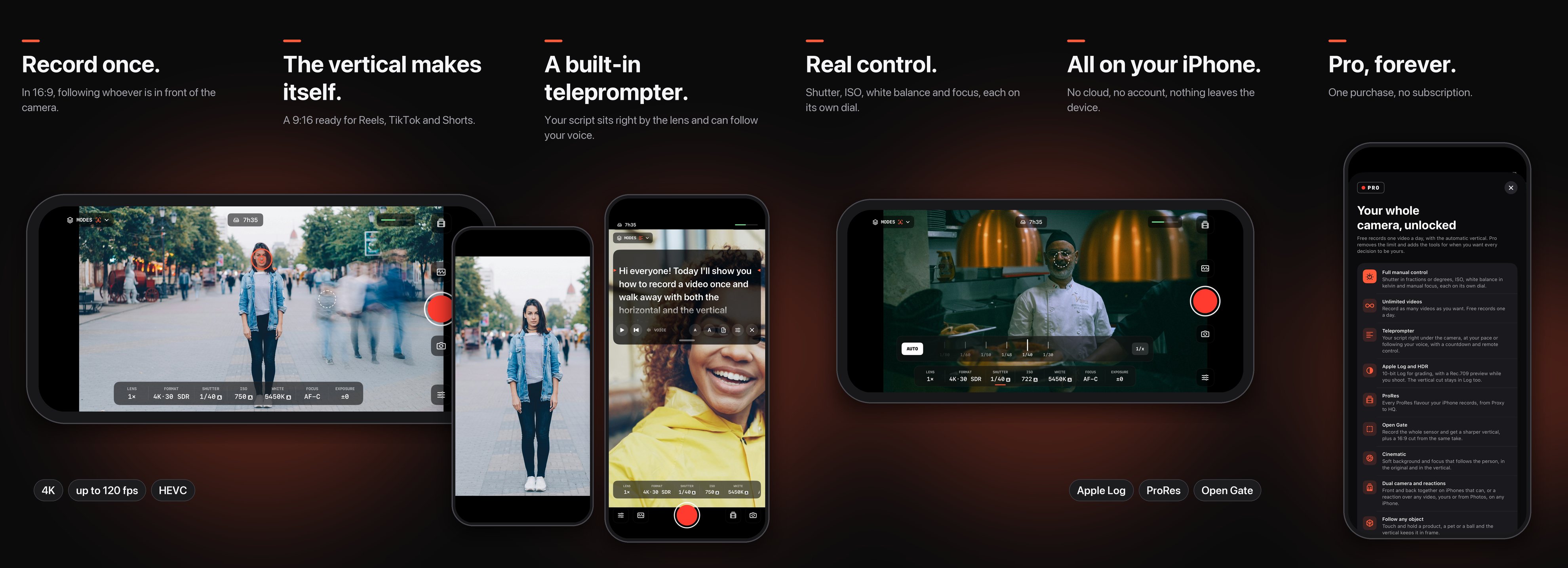
PrimoRec recording in 16:9 following the person, the 9:16 vertical, the teleprompter, manual control and Pro
How it works

One take, two videos ready

No shooting twice and no cropping by hand. You record the way you always do and the vertical comes with it.

  1. 01

    Record in 16:9

    Hold your iPhone sideways and record in HD or 4K, from 24 to 120 frames per second. The original stays exactly as recorded.

  2. 02

    The vertical makes itself

    The app analyzes the whole take, finds the person and moves a 9:16 frame along with them, smoothly and without jerks. Tap the ring on anyone to choose who to follow.

  3. 03

    All on device

    The analysis and the cut happen on your iPhone. Nothing is sent to any server. Then just preview, save to Photos or share.

Features

Free to shoot.
Pro to decide every detail.

Free records one video a day, with the automatic vertical. Pro is a one-time purchase that removes the limit and unlocks the tools a camera operator relies on.

Free

Forever

One video a day, no ads and no account. Takes under 10 seconds don’t count.

  • A vertical that follows the person

    An automatic 9:16 with a smooth virtual camera that finds the person again when they leave and come back.

  • You choose who to follow

    Tap the ring on anyone to follow them, even mid-take.

  • HD and 4K, 24 to 120 fps

    HEVC or H.264, with selectable stabilization from off to max.

  • A monitor-style viewfinder

    Readouts for lens, format, shutter, ISO, white balance, focus and exposure, plus level, grid, audio meter and space left.

Pro

One-time purchase

One payment, no subscription. Shared with your family through Family Sharing.

  • Unlimited videos

    Record as many videos as you want, every day.

  • Teleprompter

    Your script right under the camera, at your pace or following your voice, with a countdown and remote control.

  • Full manual control

    Shutter in fractions or degrees, ISO, white balance in kelvin and manual focus, each on its own dial.

  • Apple Log and HDR

    10-bit Log for grading, with a Rec.709 preview while you shoot. The vertical cut stays in Log too.

  • ProRes

    Every ProRes flavour your iPhone records, from Proxy to HQ.

  • Open Gate

    Record the whole sensor and get a sharper vertical, plus a 16:9 cut from the same take.

  • Cinematic

    On iOS 26 or later, the Cinematic look is rendered into both the original and the vertical.

  • Dual camera and reactions

    Front and back together on iPhones that can, or a reaction take over your last video on any iPhone.

  • Follow any object

    Touch and hold a product, a pet or a ball, or draw a box around it, and the vertical keeps it in frame.

  • Peaking, zebras and histogram

    The tools a camera operator relies on, drawn live over the picture.

Privacy

Your videos never leave your iPhone

PrimoRec records, finds your subject and creates the vertical video entirely on device. Videos go to Photos, or anywhere else, only when you save or share them.

Read the privacy policy →
  • No account and no sign-in
  • No analytics, trackers or ads
  • No servers: there is nowhere to upload to
  • Purchases go through Apple, which shares none of your data with us
FAQ

Frequently asked questions

How much does it cost?

Downloading is free, and free records one video a day with the automatic vertical (takes under 10 seconds don’t count). Pro removes the limit. It is a one-time purchase with no subscription: US$ 9.90 in the US. The App Store shows the final price in your account’s currency.

Which iPhones does it run on?

iPhones with iOS 18 or later. Some features depend on the model: Apple Log, ProRes, Open Gate and both cameras at once only show up on iPhones that offer them, and Cinematic needs iOS 26.

Are my videos uploaded anywhere?

No. Everything is processed on the iPhone and the app has no server. Videos stay in the app’s folder in Files › On My iPhone › PrimoRec until you delete them, and only go to Photos when you save them.

Do I have to record in landscape?

For the automatic vertical, yes: it needs the width of the picture to move the 9:16 frame. To record upright instead, just switch Follow off.

Can the vertical follow objects too?

Yes, with Pro. Touch and hold a product, a pet or a ball, or draw a box around whatever you want to follow.

I got a new iPhone. How do I get Pro back?

Sign in with the Apple ID you bought it with and tap Settings › About › Restore purchase. The Restore purchase button is also on the Pro screen.
Record once. Post in both formats.

Free on the App Store, for iPhone with iOS 18 or later.

Download on the App Store